Components
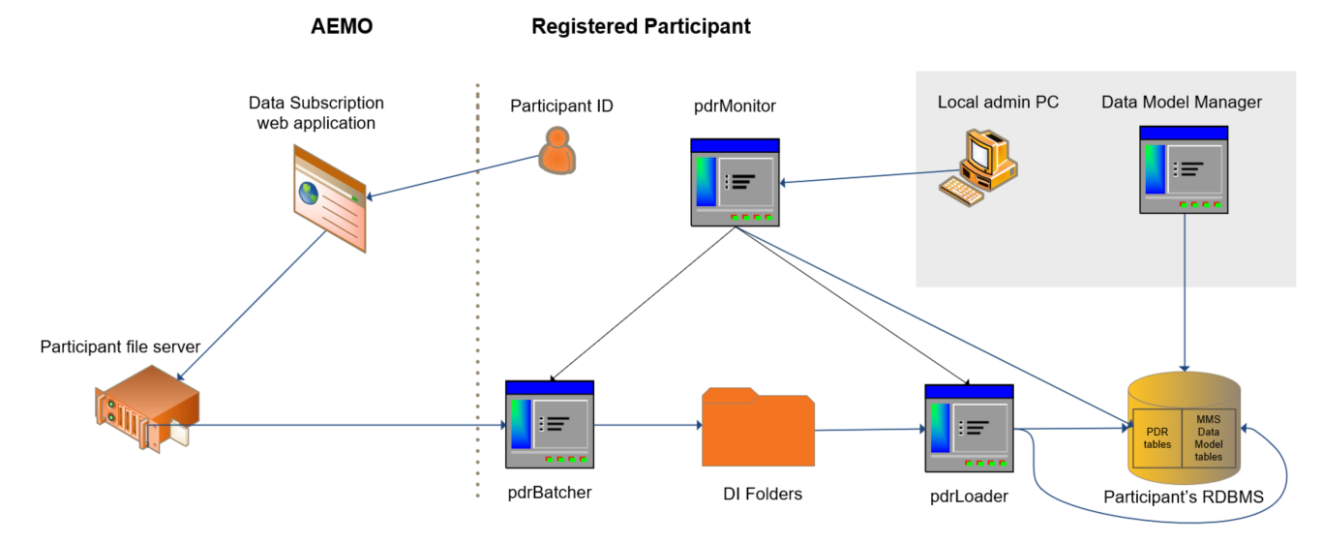
This topic describes the applications and resources making up a Data Interchange environment.
Figure 1 Data Interchange components
Data Model Manager
The Data Model Manager is an application installed on your local admin to either:
- Create a new installation of an Electricity or Gas Data Model.
- Update an existing installation to a newer version.
Data Interchange bundles
You can download the latest Data Interchange bundles from Electricity data model (MMSDM).
All the components necessary for a new installation of Data Interchange are bundled together into compressed files. Each bundle is for a specific DBMS and version of the Data Model. The bundles are for new participants who do not have their access to the Markets Portal or Releases folder.
Data Subscription
AEMO recommends subscribing to all available files and selectively loading them into your DBMS as required. This way the file is created and available if required in the future (approximately 6 months of history is retained online). Unsubscribing from files makes them unavailable in the future.
The web application in the Markets Portal allowing registered participants to:
- Obtain the latest Data Model scripts for building and maintaining their DBMS
- Subscribe and unsubscribe to the report files available in the participant file server
- View the entire list of available files.
Electricity and Gas Data Models
Establishes the target tables in a participant's DBMS conforming to the Data Model, including database tables, indexes, and constraints. It is currently delivered for Oracle and SQL Server.
Data sets provided from AEMO’s pre-production are different from AEMO’s production because the environments are operated independently.
The Data Model is usually updated with each release for example, new tables or new columns. AEMO recommends participants keep their Data Model current with new releases to avoid data loss.
Market Data
Current data
AEMO's website has the same data as distributed through the NEM file interfaces, with the exception of participant’s private data. The data is mostly in CSV format with some graphical summaries. Data retention depends on the file type, for example, Dispatch files are kept for 2 days. The section for each file type explains how long each file remains in the current directory.
To obtain current data, see http://nemweb.com.au/Reports/Current/.
Baseline data
Intended for initial loading into a participant's empty DBMS, to provide key standing data immediately prior to commencing the routine data feed.
For help populating a Data Interchange Environment with Baseline Data, see Populating baseline data to data model tables.
Historical data
Older files are moved to the Reports archive and kept for up to 13 months. To obtain historical data, see http://www.nemweb.com.au/Reports/ARCHIVE/
Monthly archive
Data older than 13 months: http://nemweb.com.au/#mms-data-model.
MarketNet
All participants must connect to the Participant File Server using AEMO’s private data network—MarketNet, which uses the FTP protocol.
The pdrBatcher defaults to use the FTP protocol, simplifying the set-up to access the participant file server.
Participant's DBMS
Contains the data received from AEMO into tables matching the Data Model.
AEMO’s production and pre-production systems are independently operated, so ensure the data from one is not confused with the other.
When maintaining the database, ensure compatibility is maintained with the Data Model. Not keeping up-to-date with new releases will compromise data integrity.
Participant Data Replication Batcher (pdrBatcher)
Responsible for transferring files to and from AEMO's participant file server to the participant's local Data Interchange folders. It can be installed in any environment supporting Java.
pdrBatcher is a batch application, therefore does not have a graphical user interface. Configuration of the pdrBatcher is done using the .properties file, which is only read when the pdrBatcher starts up, so any changes require a restart of the application.
pdrBatcher recovers from network failure to allow for recovery of missing data.
Participant Data Replication Loader (pdrLoader)
Responsible for loading files to and from participant's local Data Interchange folders to the participant's DBMS. It can be installed in any environment supporting Java.
pdrLoader polls the participant’s local Data Interchange folders and processes data from files into the participant’s DBMS conforming to the Data Model.
pdrLoader is a batch application, therefore does not have a graphical user interface. Configuration of the pdrLoader is done using the .properties file, which is only read when the pdrLoader starts up, so any changes require a restart of the application.
pdrLoader has mechanisms to identify and recover missing data.
Participant Data Replication Monitor (pdrMonitor)
A web-based interactive interface allowing participants to configure and interrogate their Data Interchange instances. Participants install the software locally to run on either Windows or unix-like operating systems.
Participant File Server
The publishing point from AEMO systems to participant systems, with each participant allocated an account and access to private and public areas. Each participant is responsible for interfacing with the participant file server.
If uncollected, files are moved to the archive folder after a couple of days. If your environment is configured properly it automatically retrieves the missing files from the archive. Files are kept in the archive for approximately six months.
AEMO’s production and pre-production environments are independently operated, so each environment has its own IP address for its participant file server.
Performance Monitor
The web application in the Markets Portal allowing Registered Participants to view a graphical interface of the current Data Interchange Performance Monitor environment run and managed by AEMO. Participants not receiving data, or experiencing data delays can contrast the data delivery performance of their Data Interchange environment to AEMO's Data Interchange performance environment.
Data Delivery
The web application in the energy Markets Portal allowing Registered Participants to:
- View the Data Interchange Status Dashboard
- Make a file delivery query
- Re-request files
- View your organisation's data sharing arrangements.