How it works
Concepts
The pdrLoader is a highly configurable multi-threaded application which facilitates loading of data from various source protocols and formats into a relational data store.
While the installations templates AEMO provides are targeted at specific market system interaction uses cases, the application is generic and participants have the capability to provide configuration to suit their specific requirements.
The figure below provides an overarching summary of the pdrLoader application architecture and capabilities.
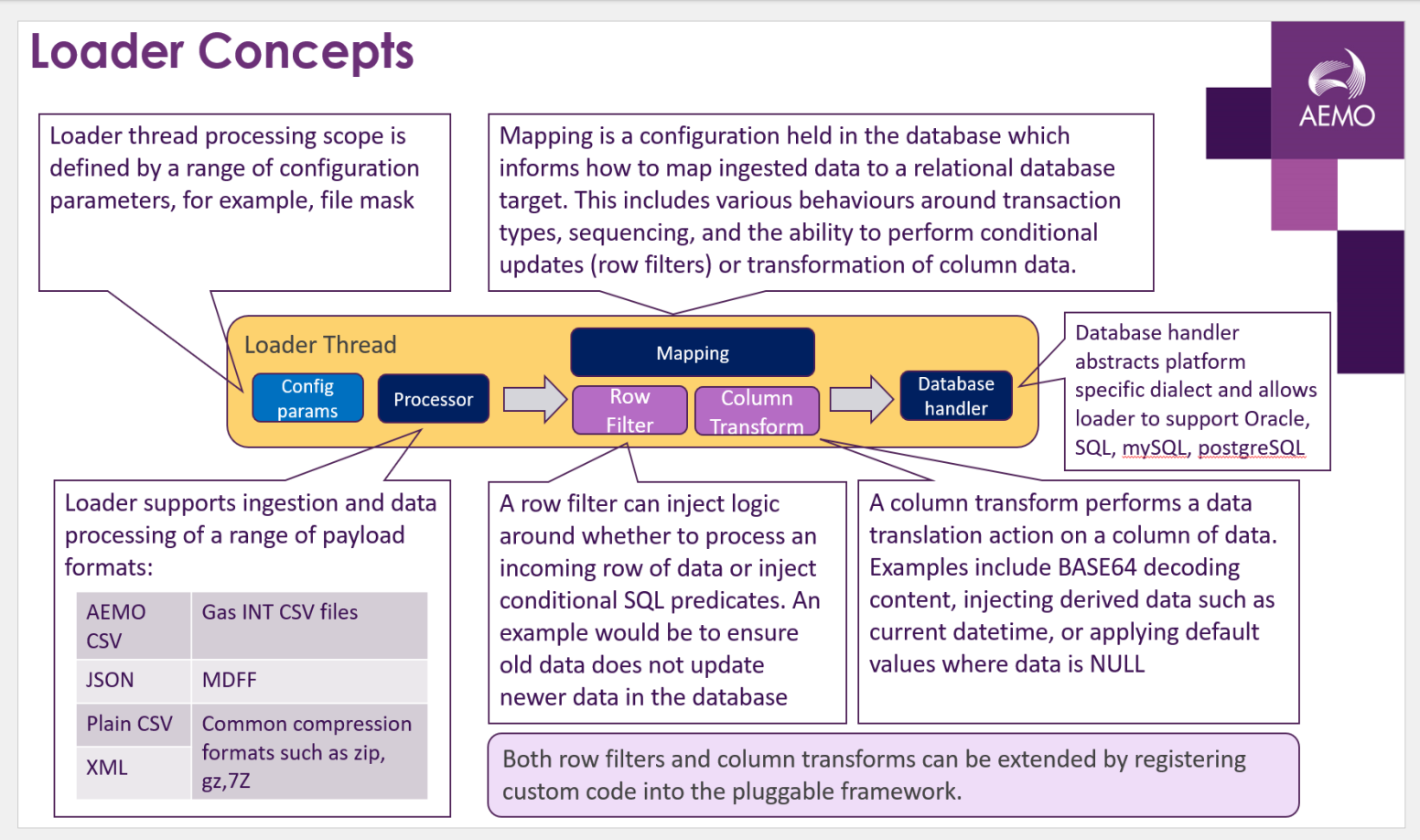
In terms of interacting with the NEM wholesale systems, pdrLoader operates by performing an intersection of columns in the source AEMO csv with the target table and loads this set, the pdrLoader application polls a local directory and processes data from files into the local database conforming to the Data Model. If the recovery features are enabled, periodically the pdrLoader application sends a manifest request file to AEMO regarding the data state within the database. AEMO sends a manifest report in response to the request. pdrLoader compares the manifest report with the local database to identify any missing data, and, if necessary, sends a request to AEMO for any missing files. So long as the intersection set includes at least the primary key column (and any not nullable columns) then something will load.The catching-up process is at a lower priority than normal file handling.
The application design of the pdrLoader is a state machine with the file locations controlling the state. This means, on restarting after a stop for any reason, the application automatically recovers by using the stored state in the local directories. Each of the local directories contains the results of the file processing, and a process in the application periodically moves files to the appropriate directory.
The design of the pdrLoader application assumes the access to the local directories is highly reliable and efficient. Hence, the recommendation is to set up the structure of the application with the local directories hosted on the machine running the application. If space is a problem, the recommendation is to use an ancillary process to empty the various local subdirectories by move or delete.
The application design of the pdrLoader uses several tables in the database for control, mapping and audit. Each CSV record updates the database according to the entries in the set of tables starting with PDR Setup.
Transaction types
How loader populates a target table is defined by a TRANSACTION_TYPE which is a mapping configuration in table PDR_REPORT_RECORDS. The supported transaction types are as follows:
INSERT
The INSERT transaction type inserts rows into a target table only when the primary key combination does not already exist. The loader follows an insert‑only pattern that checks the target table for an existing primary key before inserting data. The loader uses bind parameters during inserts to protect against SQL injection.
When multiple versions of a report contain the same primary key, the loader persists the first row it processes. Later rows with the same primary key do not overwrite existing data.
When a destination table uses INSERT‑only logic, the loader inserts a row only once for each primary key. The loader keeps the first row it processes for that key and ignores all later rows with the same key, regardless of report version. When an older report version loads first, the loader does not populate missing columns from a newer version processed later.
UPDATE-INSERT
The UPDATE‑INSERT transaction type performs an upsert operation on the target table.
pdrLoader first attempts an update. When the update affects no rows, the loader then performs an insert. It also supports the reverse order as INSERT‑UPDATE. In this mode, the loader attempts an insert first and performs an update only when the insert does not create a new row.
Update operations handle out‑of‑order data delivery. pdrLoader uses a timestamp identifier to compare incoming data and ensure that newer data takes precedence over older data.
Caching
Mapping configuration caching
The loader caches data from the PDR_REPORT_TYPE_CONFIG and PDR_REPORT_RECORDS tables in memory to improve performance. The loader refreshes this in‑memory cache every two minutes by default. An optional parameter in the properties configuration file controls this setting:config_cache_timeout=120
As a result, mapping configuration changes made directly to the PDR_REPORT_TYPE_CONFIG and PDR_REPORT_RECORDS tables through SQL updates may take up to two minutes to take effect.
When the loader service restarts, the loader refreshes the mapping configuration during startup.
Database configuration caching
The loader caches database structure details, including column definitions and primary keys, for target tables listed in PDR_REPORT_RECORDS. This cache improves performance during data loading. The loader loads database metadata on demand. It fetches metadata for a destination table only when the loader processes data for that table for the first time.
An optional parameter in the properties configuration file controls the database cache timeout in minutes: db_cache_timeout=30
Valid values include:
-
-1 to disable caching (default)
-
Any value greater than 30 minutes
After the loader completes processing a PDR_CONFIG file, the loader clears the database cache. A PDR_CONFIG file refers to an AEMO csv file configured to load data into the PDR_REPORT_RECORDS mapping table.
When a database structure change occurs after the loader caches metadata, the loader does not populate newly added columns until a cache refresh occurs through a service restart or a configured cache timeout. Changing a primary key definition while the loader runs introduces a higher risk. A mismatch between cached metadata and the physical database structure can cause data load failures.
To change the primary key definition:
-
Stop the NEMReports producer instance at the source.
-
Allow all pending replication messages to complete and confirm an empty replication queue.
-
Apply the structural update at both the source and the target.
-
Restart the loader service at the target to load the correct database definition.
-
Start the NEMReports producer instance.
Transactional integrity
The loader maintains transactional integrity in the target by committing each replication message within a single transaction.
The loader supports incremental commits when it processes a large payload. A configuration parameter in the properties file controls the row threshold for incremental commits: db_max_transaction_size=20000. Increasing this value helps prevent the loader from exceeding the limit. This feature prevents long‑running transactions and reduces the risk of database errors such as ORA‑01555: Snapshot Too Old. When an error occurs during replication message processing, the loader rolls back the entire transaction.
Common causes include:
-
Data that exceeds the size of a target database column, such as an over‑length string caused by a schema mismatch between source and target
-
An active mapping in PDR_REPORT_RECORDS that points to a destination table missing from the target database
In these scenarios, the loader loads no data from the replication message, including rows that otherwise contain valid data.
Mapping configuration mismatches
When the loader processes a replication message without a matching mapping configuration, one of two outcomes occurs.
A previous version of the mapping exists
Consider an example where the following mapping data exists:

A replication message then arrives with a higher version of the same record. The loader searches for an existing mapping that matches the (REPORT_NAME, REPORT_SUB_TYPE) key. The loader then rolls the previous configuration forward and continues loading data from the new replication message into the DISPATCHPRICE table.
After this step, the loader inserts a new row into the PDR_REPORT_RECORDS table.

The loader sets the IS_NEW flag to 1 on this row to mark configurations that the loader generates automatically. After you understand the cause of the unexpected data flow, you can manually reset IS_NEW to 0.
No previous version of the mapping exists
When the loader detects a new data set in a replication message, such as a new replication table, the loader creates a placeholder mapping in the PDR_REPORT_RECORDS table.
For example, a replication message identifies a new data set with the key (DISPATCH, XXX, 1). The loader inserts a corresponding record into PDR_REPORT_RECORDS with default values.

The loader continues processing the replication message but skips loading the unmapped data. To repair the configuration, update the relevant fields with the correct values and apply a data model release to the target database when required.
The loader also resolves unmapped configurations by sending a CONFIGURATION request back to the AEMO systems.
Automated configuration management
The pdrLoader application can detect and repair missing configuration data in the PDR_REPORT_RECORDS table. In a default installation, the CONFIGURATION capability is enabled. To enable this functionality, set the following configuration in the pdrLoader.properties file.
# Turn on automated configuration management
file_load_auto_config=true
Missing configuration can occur when pdrLoader receives a CSV report that does not have a corresponding mapping record in the PDR_REPORT_RECORDS table. In most cases, participant systems that maintain a connection to a source AEMO environment do not experience this issue because AEMO automatically pushes mapping configuration updates to participant systems.
If this situation does occur, pdrLoader creates a dummy record in the PDR_REPORT_RECORDS table using the new mapping. For more information, see No previous version of the mapping exists.
You can identify generated mappings by:
- Running a direct SQL query on the PDR_REPORT_RECORDS table where IS_NEW = 1.
- Viewing them in Data Interchange Settings tab within pdrMonitor. Reports that contain generated mappings are highlighted with an orange background and display Y in the IS_NEW column.
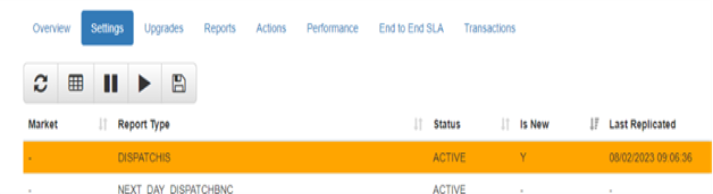
The pdrLoader application includes a second process that detects generated dummy mappings and creates a CONFIGURATION request for AEMO systems.
The purpose of this request is to allow AEMO systems to return the correct mapping configuration, restore the local configuration to a complete state, and enable the data to be loaded into the local database.
By default, the process that detects missing configuration runs every 10 minutes. When the condition described above is met (rows in the PDR_REPORT_RECORDS table where IS_NEW = 1), pdrLoader generates a CONFIGURATION request file containing the details of the mappings that require completion.
A sample request file is shown below.
C,NPMN11G,REQUEST,PRTDBSYB,PRIVATE,2022/10/06,08:21:30
I,REQUEST,CONFIGURATION,1,PDR_REQUEST_ID,INSTANCE,REPORT_NAME,REPORT_SUB_TYPE,VERSION
D,REQUEST,CONFIGURATION,1,13025,NPMN11G,INT653,NULL,3
D,REQUEST,CONFIGURATION,1,13025,NPMN11G,PREDISPATCH,INTERCONNECTOR_SOLN,2
D,REQUEST,CONFIGURATION,1,13025,NPMN11G,CAUSER_PAYS_SCADA,GENERATION,1
D,REQUEST,CONFIGURATION,1,13025,NPMN11G,DISPATCH,REGIONSUM,9
D,REQUEST,CONFIGURATION,1,13025,NPMN11G,DISPATCH,REGIONSUM2,9
C,"END OF REQUEST",8
After processing the request file, AEMO systems generate an acknowledgement of the request.
A sample response file is shown below.
C,NEMD11,RESPONSE,AEMO,PRTDBSYB,2022/10/06,09:19:25
I,RESPONSE,CONFIGURATION,1,PDR_REQUEST_ID,INSTANCE,STATUS,ERROR_MESSAGE
D,RESPONSE,CONFIGURATION,1,13024,NPMN11G,SUCCESS,
C,"END OF REPORT",4
Processing a CONFIGURATION request generates a series of reports that AEMO delivers through the standard delivery channels. Each individual item in the CONFIGURATION request produces a separate PUBLIC_PDR_CONFIG_*_REQUEST.zip report file.
A sample configuration report file is shown below.
C,SETA.WORLD,PDR_CONFIG_REQUEST,AEMO,PUBLIC,2022/12/01,00:03:03,0000000375191834,PDR_CONFIG,0000000375191834
I,PDR_REPORT,TABLE,1,REPORT_NAME,REPORT_SUB_TYPE,VERSION,DESTINATION_TABLE,TRANSACTION_TYPE,ROW_FILTER_TYPE,IS_NEW,IS_ACTIVE
D,PDR_REPORT,TABLE,1,GASBB,GAS_SHORT_TERM_CAP_OUTLOOK,1,GAS_SHORT_TERM_CAP_OUTLOOK,INSERT,,0,0
C,"END OF REPORT",4
The pdrLoader processes this report file in the same way as any other report and loads the updated configuration into the PDR_REPORT_RECORDS table. As part of this process, pdrLoader clears the IS_NEW flag to indicate that the configuration has been confirmed.
Participants that use customised thread configurations for pdrBatcher must ensure that PUBLIC_PDR_CONFIG_*_REQUEST.zip reports are available to all loader instances. If the requesting loader instance does not receive the report, it continues to request the same missing configuration data every 10 minutes.